
Overview
Seller Dashboard Home is my latest project in Tokopedia, and this is one of the biggest projects we had for our team in the Merchant side. Seller Dashboard Home is a vital part of the seller’s journey in order to help sellers manage day-to-day operations and as a communication platform between Tokopedia to Sellers.
Timeline
Sep – Nov 2019 • Phase 1. Create foundational infrastructure
Jan 2020 – Mar 2020 • Phase 1.5. Evaluate and Redesign the foundational infrastructure
Team members
Ivana Elisa – UX Designer
Pria K – UI Designer
Hatta Bagus, Andri Dwinanda, Pinkan Irliane – Product Manager
Ahmad Ibnu, Clarissa– WP Engineer
My Role
- Designed end-to-end experiences for both desktop and mobile platforms.
- Led co-design sessions with the merchant team (Product, Business, and Tech team).
- Collaborated closely with the Product Manager to align the product vision and project roadmap prioritization.
- Collaborated closely with UX Researcher to conduct comprehensive user research.
- Created comprehensive design documentation.
- Conducted design QA (bushbash) to ensure high-quality design output.
Outcome
- Increased Seller Dashboard Home DAU (Daily Active User) by ~20%
- In the first three months after the release of Seller Home 1.5 Phase, CTR (Click-through rate) for each widget is more than ~50%
- Enhance scalability and flexibility for further development
- Seller home as a main reference for standardizing the entire Tokopedia seller dashboard pages
Problems
According to research, we found that Tokopedia sellers can’t optimize the seller dashboard. Given the facts that:
- Seller dashboard home performance is very low, below 30% of active sellers visit the page and on a daily average, the active sellers only visit 1-2 times and spend 6 minutes in a day.
- Merchant has very low intentions due to no clear value proposition to visit.
- The unclear structure of the seller home dashboard.
Another challenge also came from our development team which usually needs more effort in every improvement because they always build new components that can not be reusable.
Solution
As a result, we came up with Seller Dashboard Home: The one-stop platform solution for Merchants to perform end-to-end activities from starting business to growing their business. But before we go any further, we make an initial approach by creating the fundamental user needs in the seller dashboard home which is for helping sellers manage day-to-day operations. And create design component guidelines to prepare the ultimate vision.

Research
I collaborated with Product Managers and Researchers to conduct preliminary research to ensure that we fully empathize with our users. Our research utilized the analytics data review, qualitative and quantitative approaches to gather insights and data. This approach allows us to gain a comprehensive understanding of our users’s behavior, pain points, and needs on the Tokopedia seller dashboard home.
The analytical review objective: to understand user behavior in day-to-day activities as a Tokopedia seller
The qualitative objectives:
- To gain insights of user pain points and needs in day-to-day seller activities.
- To explore potential ideas for optimizing the user experience of Seller Dashboard Home.
The quantitative objectives:
- To measure the urgency of the pain points identified through qualitative research.
- To measure the significance of the improvement ideas gathered from the internal workshop/ brainstorming session.
Who are Tokopedia Seller Home users?
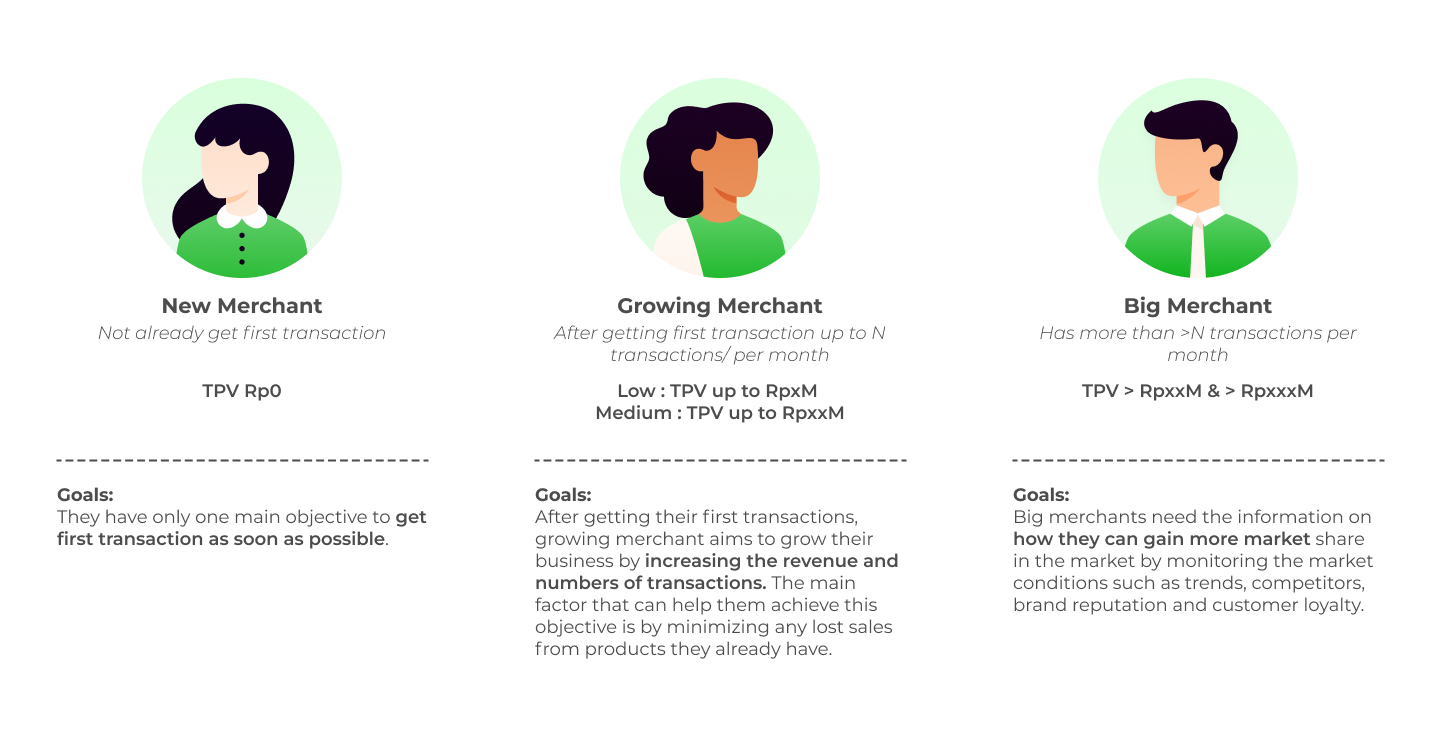
We classified sellers into 2 segments. The first segmentation is based on seller membership, such as Regular Merchant, Power Merchant, and Official Store. The other segment is the seller tier which is grouped based on seller transaction revenue (TPV/ Total Payment Volume).
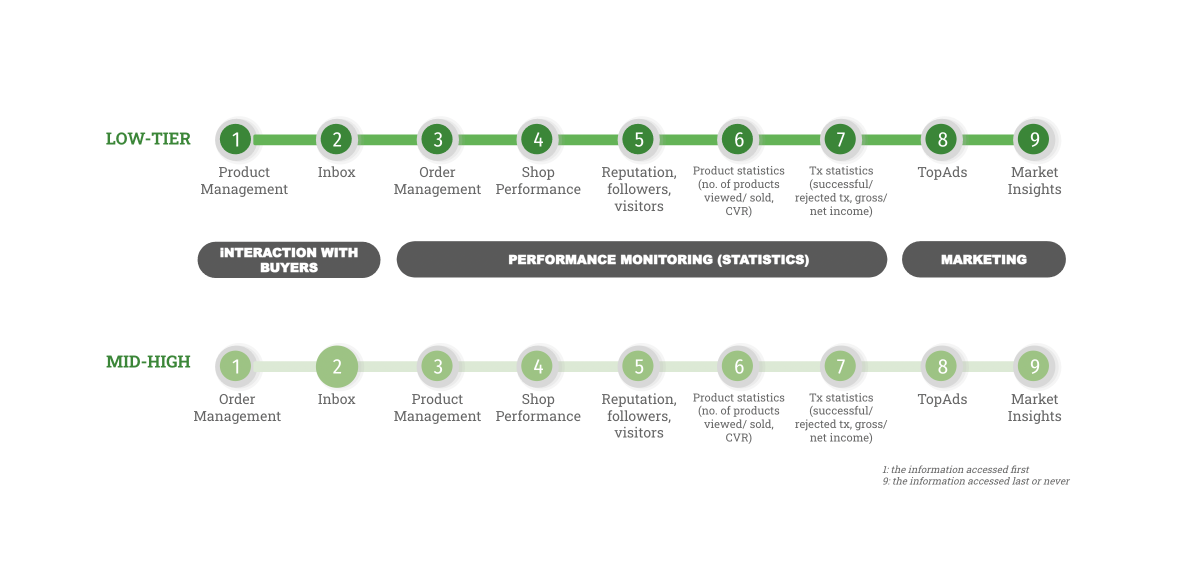
From the analytics, we found that the type of membership has no significant difference in insight. Whereas, if we look from the seller tier we found that the lower tier will spend more time on shop setting and adding products, we conclude that the lower tier more focus on how to get transactions and attract buyers. We also found that the higher tier will spend more time on order, pusat resolusi, and chat. Here we conclude that the higher tier more focus on how to minimize complaints and improve transaction quality.
What are users’s pain points when manage day-to-day seller operations?
We dived deeper and found that there are several pain points that users experience during the day-to-day seller activities in Tokopedia based on the seller type:
New Merchant
- Overwhelmed by the many features that Tokopedia provides.
- Low upload products rate due to lack of guidance to prepare shop and products.
- Difficulty in getting conversion/ transaction. They need 9 days in average to get their first transaction.
- Difficulty getting Tokopedia assistance when needed.
Growing Merchant
- Unclear direction on how to get more product traffic and increase transactions.
- Low response rate and slow response time for merchants to engage with the buyer.
- Merchants don’t know what aspects influence their shop performance
Big Merchant
- Unclear direction on how to maintain customer engagement.
- Unclear campaign insights.
- Unclear information for expanding the business.
What do users’s need to improve the seller home experience?
Workshop/brainstorming session
To answered this question, I conduct a workshop with relevant stakeholders including Product Managers and Business team from Regular, Power Merchants and Official Stores to build hypothesis by collecting as many as possible of our seller points of view. We used this pattern to ensure our hypotheses match the seller’s needs.
I need to [Seller’s needs] because [Insight/data]
Connecting the dots using the affinity diagram. We created an affinity map as a group to identify themes from our hypothesis.

Survey
After collecting hypotheses, then I collaborated with Product Managers to conduct quantitative research by a survey. We choose active seller segmentation by TPV as our target audience. We used survey method to help us quickly learn about the most important user needs and the pain points seller when selling and manage day to day Seller operations.
The insights are summarized as follows:
- Easy accessibility for important tasks
- Merchants should be notified of important tasks that need immediate action.
- Grouped the daily tasks to prevent users missed important tasks due to many notifications.
- Merchants should know the priority of tasks that must be done first.
- Relevant guidelines and recommendations
- Merchants should get relevant guidelines based on their stage.
- Merchants should be provided insights and recommendations based on their performance.
- Performance Monitoring
- Merchants should be aware to maintain their shop and product performance.
- Merchants should be able to take immediate action to improve their performance.
Pre-Design Process
Competitive Benchmarking
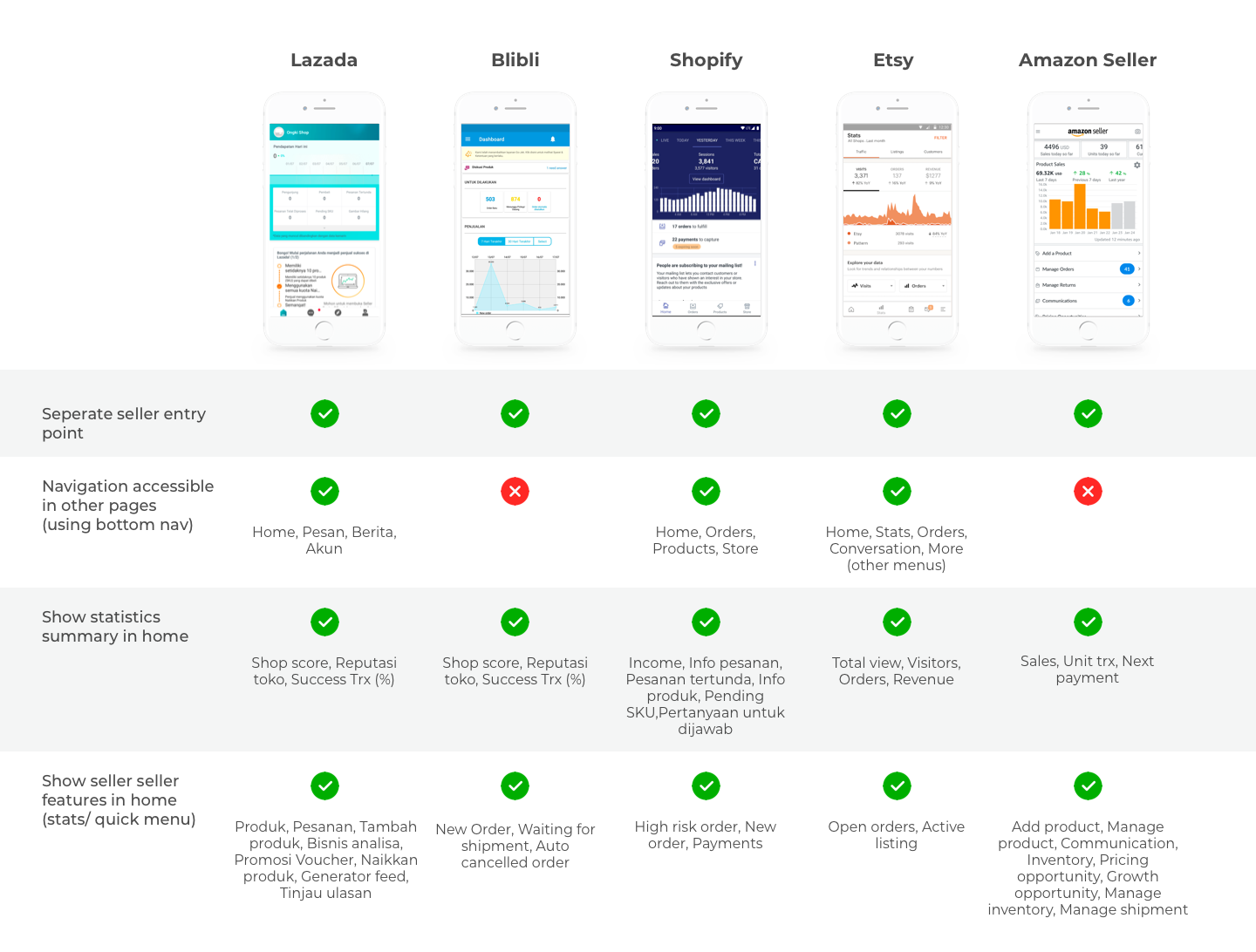
I conduct competitive benchmarking analysis with with local and global e-commerce. The process aims to understand who the competitors are, their strategy, the strengths and weaknesses of their products in comparison to ours so as to improve our design solutions.
Define and Align the Vision
In addition to the preliminary research and desk research, I also conducted a collaborative design workshop with the internal Merchant team, including the product, business, and tech team. Working together in a sprint, together we make potential design solutions, and prioritize the gathered solutions.
During the co-design workshop, we specifically focused on the three topics related to Tokopedia Seller.
- Ease of maintaining merchant’s daily activity
- Ease of monitoring shop performance
- Relevant guidelines and recommendation

During this session, we were able to gather several innovative solutions that have the potential to improve the overall Seller Dashboard Home experience.

Priority Matrix
At the ideation stage, we list all potential solutions. This allowed us to categorize the solutions based on the impact and effort required to implement. The results are we were able to prioritize the ideas and identify which ones to pursue further in our efforts to enhance the Tokopedia Seller Dashboard Home.
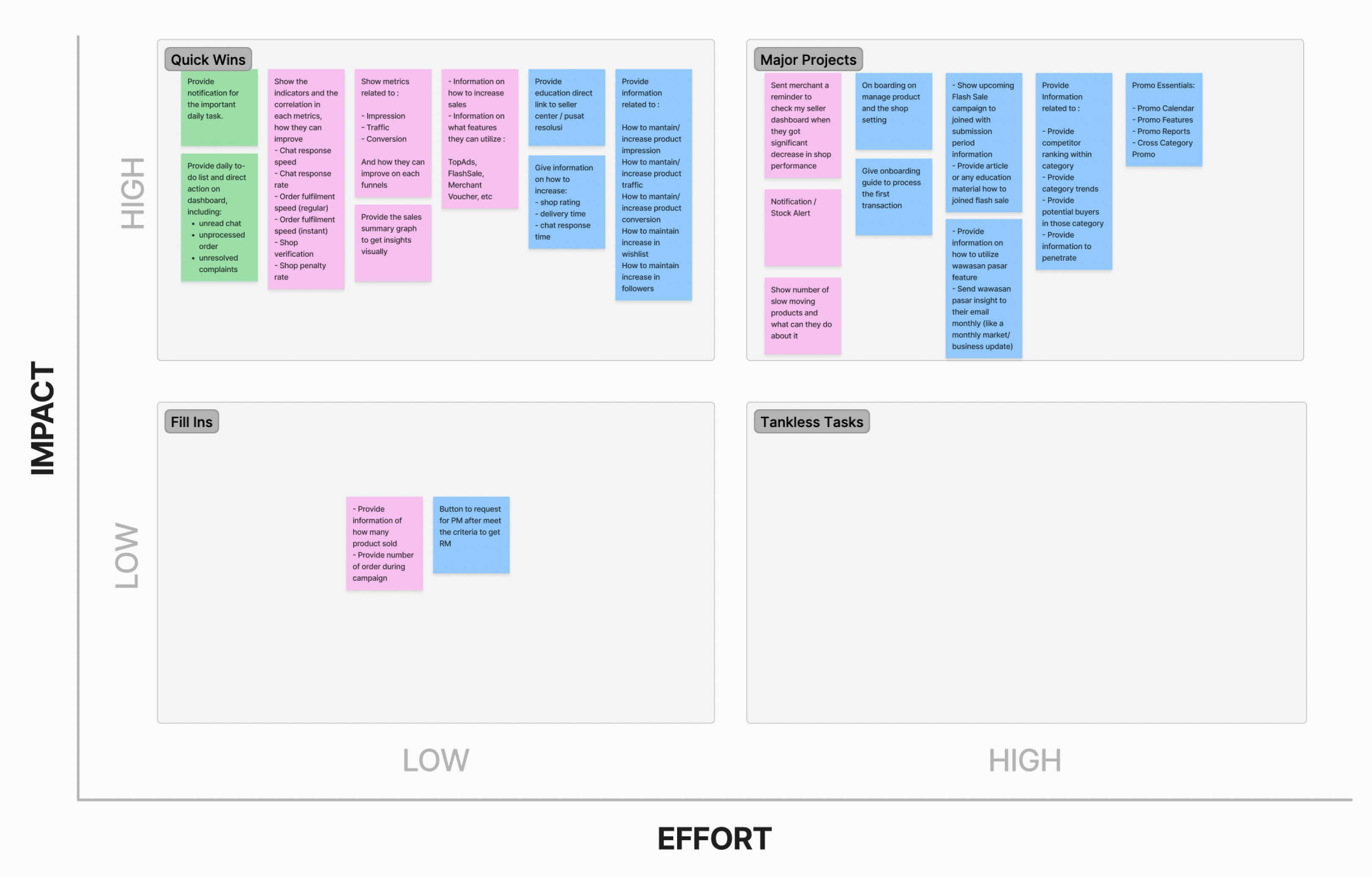
We realize that the seller’s needs are very different compared with others, and even in the future it will grow. We have an ultimate vision to build a personalized dashboard to answer all the sellers’ needs. But to lead that vision, we need a lot of data to know what matters for our sellers by building a platform that can be personalized. So, after careful analysis by considering the solutions and the priority, we decided to focused on build a basic foundation to define what information is in the seller home.
The following design solutions that have been selected:
- Ease of maintaining merchant’s daily task.
- Provide alert and entry points for important daily task.
- Ease of monitoring shop performance.
- Provides sales summary insights
- Provides a real-time shop performance score.
- Ease of getting relevant guideline and recommendations.
- Provide article/ information related to the seller stage.
- Provide recommendations based on the shop performance.
- Classify the seller tools/ features based on the seller stage.
- Develop a tracker on each widget for the seller home ultimate version.
Seller Home Hierarchy of Needs
Here is the seller’s basic needs which are divided into 4 main pillars. Including daily activities, performance monitoring, growing business, and support education. This basic need become a foundation to define what information is in the seller dashboard home.

Design, Evaluate, and Iterate
Phase1 – Create foundational infrastructure
Before going further the ultimate personalised seller dashboard home, we tried to map out all the basic seller features. This aimed to provide seller to the relevant feature based on the seller journey for the initial phase. I conducted it with the internal product team, we try to think as a merchant to discover how user understand and categorize information. The result can be used as a reference in providing guidelines and feature recommendations to sellers. So that the information displayed in seller dashboard home is more relevant according to the merchant’s needs.

After the collaborative design sprint, I started to translate the solution for the seller home page into design. I explored several design alternatives, carefully weighing the pros and cons of each option. I also collaborated with the Product Manager to consider the usability testing strategy. We decided to make an experimental approach by develop tracker on each section and monitoring the post-launched performance. This aimed to get more quantified insights and the most effective approach due to time constraints.

After 3 months launched, we evaluated the Seller dashboard home performance. We find that the performance has not shown significant results. It can be seen that there is still a small percentage of users visiting page. So, we decided to revisit this improvement and do iterations.
Another significant challenge also came from the development team, they usually faced difficulty on build a new components that can not be reusable on every improvement in seller dashboard.
From this challenge, we found an opportunity to improve the seller dashboard home design with a widget concept that can be reusable on other seller dashboard pages. It aimed to minimize the development effort and also ensure a consistency design for the entire seller dashboard.
Phase 1.5 – Evaluate and Redesign the foundational infrastructure
Discovering Seller Dashboard Home
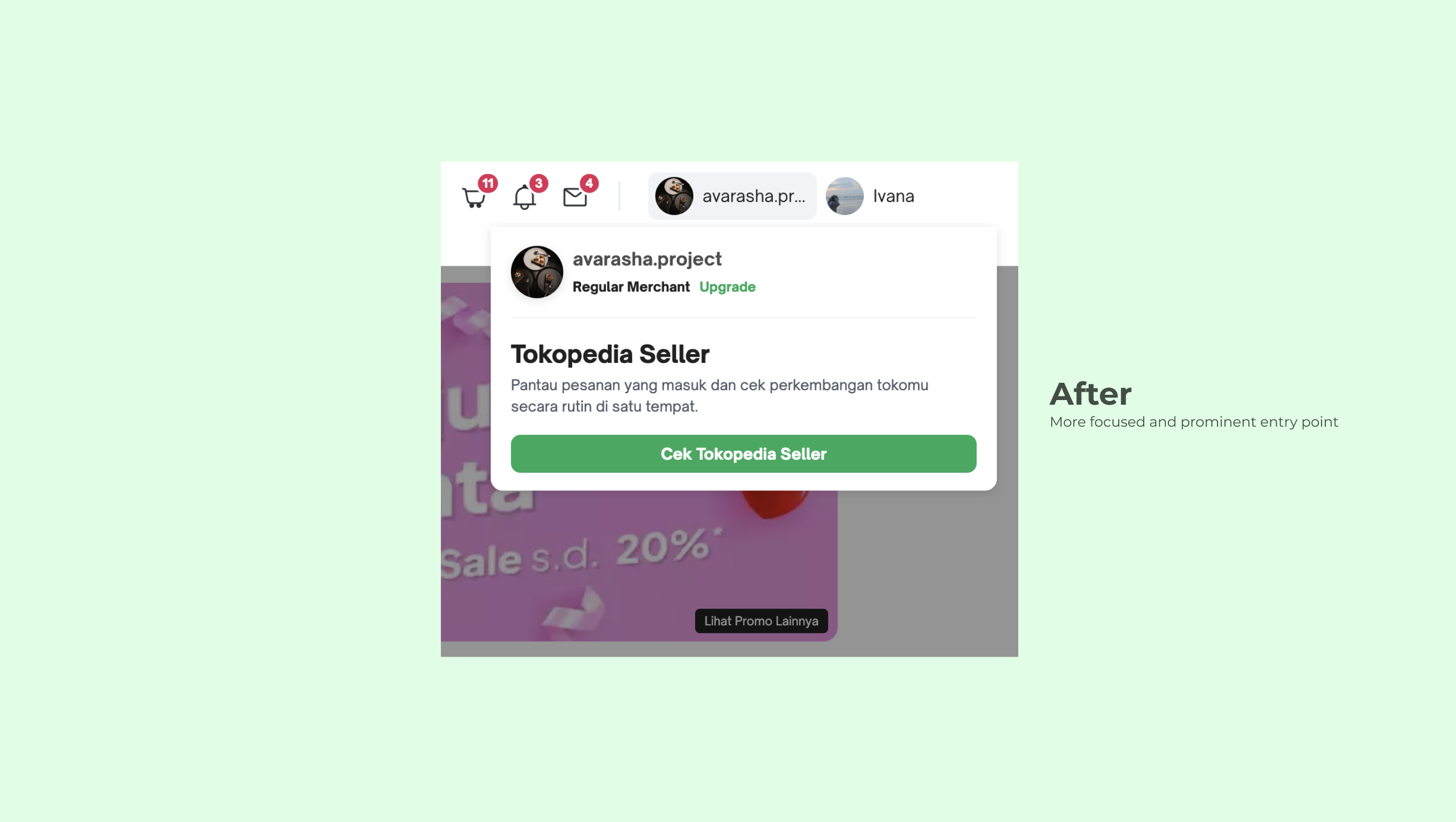
The first thing first we revisit is the seller home entry point. This problem came from our hypothesis on current entry point design. The data shows that the percentage of users who access the seller dashboard home is smaller compared to other menus in the top menu bar. Merchants was indicated to be distracted performing other tasks rather than on the Seller Dashboard. So, we decided to improve the Seller Dashboard entry point in the top menu bar so that it is more focused and to prevent redundant entry points.

Revisit the foundational infrastructure priority
We call this phase 1.5 because basically the foundational infrastructure of the page is still the same but we are trying to revisit the priorities of existing widgets. To revisit the current infrastructure, we started to analyze the tracker performance result. We focus on analyzing CTR (click-through rate) metrics, that measures how many user clicked on the widgets. For our initial hypothesis, we concluded that a higher CTR indicates that is the most important widget for merchant, a smaller CTR indicates less priority widget, and so on.
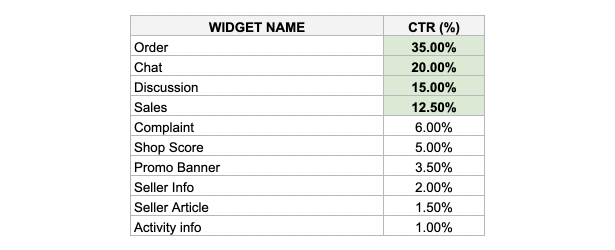
To validate our hypothesis, I collaborate with Product Managers and Business teams to conduct a survey regarding to the Seller Dashboard Home improvement phase 1. The following are the key insights of survey:
- 97% Seller said that is important to show shop performance in a seller home.
- 77% Seller need more relevant directions to do something about sales.
- 92% Seller said they need latest information on seller dashboard due to they have difficulty accessing information from multiple sources.
Seller Dashboard Widget Concept
- Breaking down into widgets to be able to provide high relevance to merchants, the Homepage has to be broken down into multiple widgets. This concept aims to prepare a customization seller home concept: order and content of each component then can be adjusted to fit the current state of the merchants. Understanding the stages and actions required by the merchant, they will be presented most relevant information depending on the situation.
- Breaking down Widgets then further broken into components, a widget can consist of one or multiple components that can enhance scalability and flexibility for further development while at the same time maintaining consistent looks and feels in seller dashboard.
- Providing guiding principles, as a platform, Dashboard will provide standardization that any other products/ services. This includes user experience as well as reliability requirements. The products/ services offered to merchants through the dashboard also consider the life cycle of the merchant. Dashboard Home will be the gatekeeper to these incoming new integration from other respective team/feature in the future.
I collaborated with the UI designer to build a widget guideline. With the aim to build clear principles according to user needs, standardize usage, and maintain consistency and experience. Following is a guideline that we made for further improvement.

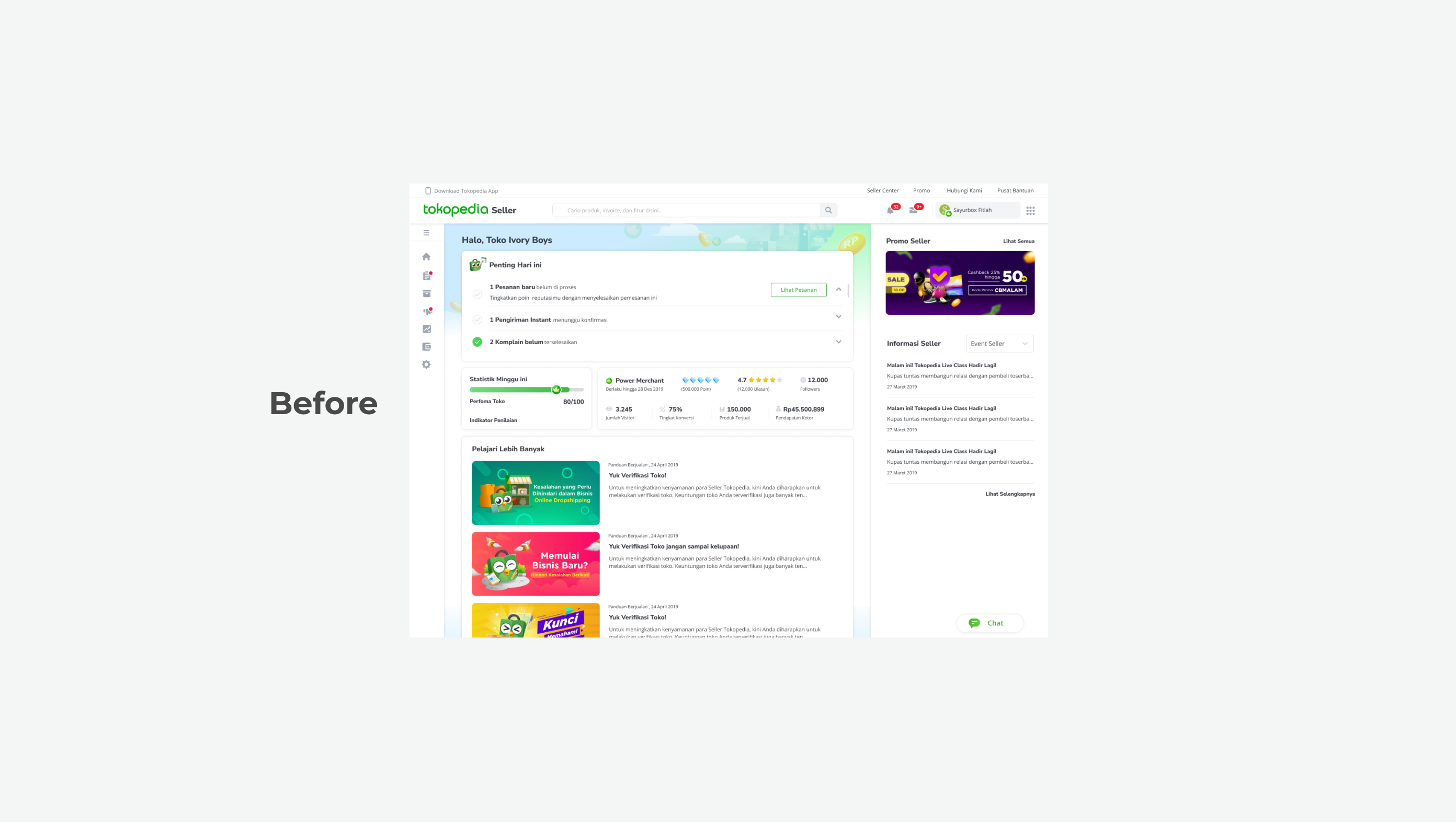
We come up with revisiting the seller dashboard home result. We made quite a big change in this phase. We continue to do performance tracking for each widget, aiming that iteration will give better results. The following are the improvements to the seller dashboard home:
- Changed the entire UI widget with a new structure concept.
- Based on the survey, we found that shop performance metrics are still important to monitor daily. We decided to placed the widget in the second order and make it still above the fold so that users still easily monitor it at one glance.
- We only emphasize shop performance metrics that really matter to the merchant. Aimed to prevent them from being overwhelmed with unnecessary metrics. The metrics displayed include:
- Shop performance
- Product performance
- Sales performance
- We decided to place the seller information at the lowest priority, considering user will access it rarely. But they still can access it when needed.

High Fidelity Design
Important daily tasks with just one click action
This section emphasized activities that become daily activities and directly impact the shop’s performance score. The shop’s performance score is a value that sellers must maintain because it reflected their credibility.

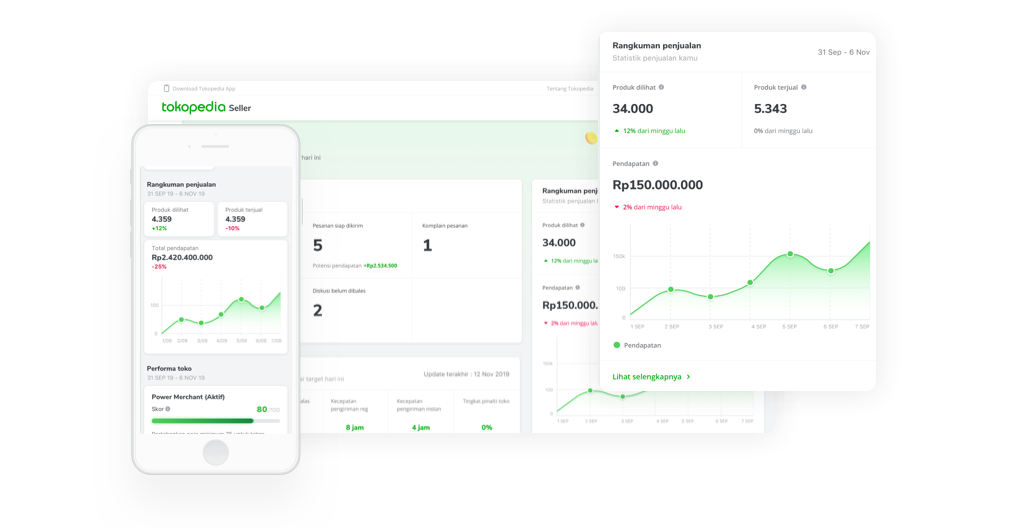
Quick summary on sales performance
This section showed the related metrics in terms of how seller getting revenue. Starting from the product view, number of product sold until the number of successful transactions.
Updated shop performance to monitor shop
Shop performance is monitored to maintain the seller’s performance. Seller can immediately take an action for improvement based on suggestions.

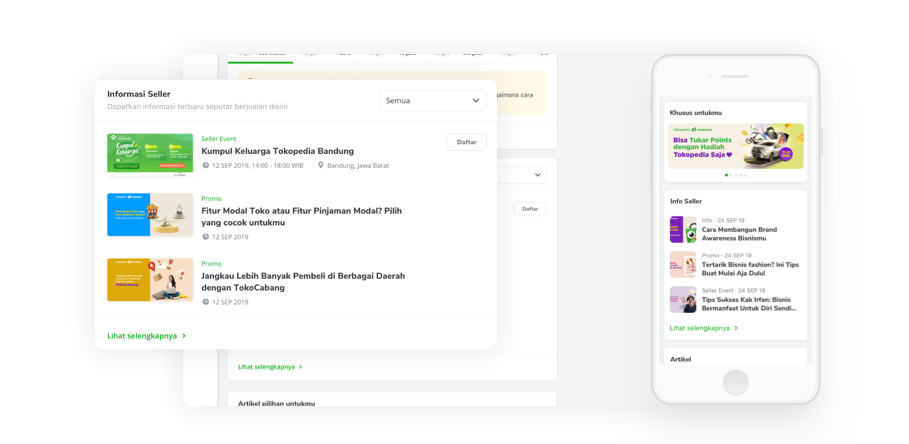
Communication between Tokopedia to Seller
Centralized communication around seller education, feature updates, seller promos, and others to support seller activity.
Desktop Preview
Mobile Preview
Next Actions
The potential for build an ultimate seller dashboard home is indeed substantial, and we have generated numerous ideas through competitive benchmarking and user interview on how users would utilize this feature.
- Standardizing all widgets in seller dashboard
This innovation will involve cross tribe functions at Tokopedia. This includes user experience as well as reliability requirements. The products or services offered to merchants through the dashboard also consider the life cycle of the merchant. Dashboard Home will be the gatekeeper to these incoming new integration from other respective team or feature in the future. - Intelligent machine learning for shop performance assessment
This innovation will provide more relevant insight to merchants regarding product quality and shop performance. So that merchants get recommendations or tools that more relevant in the future. - The Ultimate Personalized Seller Dashboard Home
Seller home will allow sellers to do customization in the future. Users can easily customize widgets for the entire page based on their needs. This innovation allows the further development of the ultimate personalized seller home dashboard.
While I’m not part of the upcoming improvements, I’m excited to have been part of this foundational ideation and I am excited to look forward on other improvements in a user-centric way. By exploring these possibilities the seller dashboard home can remain valuable and relevant to our users.
Results
After 1 month of Seller Home Phase 1.5 launched, we always monitor the performance. In the early stage seller home dashboard has shown better performance. We focus on retention and engagement metrics, showing that the number of DAU (Daily Active Users) in January increased from 30% to 50% of users and the average CTR (Click-through rate) for each widget is more than 50%. From here we know that the initial stage results were a good start and it was proven that the basic needs were very helpful for our sellers.


And currently, some improvements have been made to the ultimate version without eliminating the fundamental concepts. The concept of widgets and components has been applied to almost the entire seller dashboard, not only on the home page. This solution has proven to be more scalable, saving much effort and development time better than before.

*) All screenshots were captured in February 2020, and my contribution ended in March 2020.
currently, Seller Home Tokopedia has done some iterations.
Learnings
A never end project
This is a project that has given me the tools to communicate with stakeholders whose backgrounds are very different from mine. The interview muscles that I trained there have been helping me to deliver every idea better than before.
Tapping into how companies support research has also become an ongoing project of my passion, especially when the challenge involves complex organizational structures and multiple audiences.
Also from this project, I understand that the basic needs must be truly defined for the first foundation before jumping to the solutions. Because solutions can come with many choices, but the biggest mistake is when we solve the wrong problem(it’s too late).
👋 Let’s connect
Let’s build something together or just say hello to me. I’d love to reply, share & gather insights with you.
© 2023 Ivana Elisa All Rights Reserved
 Ivana Elisa